
Aethra Color Scheme
Aethra is a minimalist color scheme for Sublime Text, designed with simplicity and clarity in mind.
Details
Installs
- Total 407
- Win 225
- Mac 93
- Linux 89
| Jan 8 | Jan 7 | Jan 6 | Jan 5 | Jan 4 | Jan 3 | Jan 2 | Jan 1 | Dec 31 | Dec 30 | Dec 29 | Dec 28 | Dec 27 | Dec 26 | Dec 25 | Dec 24 | Dec 23 | Dec 22 | Dec 21 | Dec 20 | Dec 19 | Dec 18 | Dec 17 | Dec 16 | Dec 15 | Dec 14 | Dec 13 | Dec 12 | Dec 11 | Dec 10 | Dec 9 | Dec 8 | Dec 7 | Dec 6 | Dec 5 | Dec 4 | Dec 3 | Dec 2 | Dec 1 | Nov 30 | Nov 29 | Nov 28 | Nov 27 | Nov 26 | Nov 25 | Nov 24 | |
|---|---|---|---|---|---|---|---|---|---|---|---|---|---|---|---|---|---|---|---|---|---|---|---|---|---|---|---|---|---|---|---|---|---|---|---|---|---|---|---|---|---|---|---|---|---|---|
| Windows | 1 | 0 | 0 | 0 | 0 | 0 | 1 | 0 | 0 | 2 | 0 | 0 | 1 | 1 | 1 | 0 | 1 | 1 | 0 | 0 | 1 | 0 | 0 | 0 | 1 | 1 | 0 | 0 | 0 | 1 | 0 | 1 | 0 | 2 | 1 | 0 | 2 | 0 | 1 | 0 | 0 | 0 | 0 | 1 | 0 | 1 |
| Mac | 0 | 0 | 0 | 0 | 0 | 0 | 1 | 0 | 0 | 0 | 0 | 0 | 0 | 0 | 0 | 0 | 0 | 0 | 0 | 0 | 0 | 1 | 0 | 0 | 0 | 0 | 0 | 0 | 0 | 0 | 0 | 0 | 0 | 1 | 0 | 0 | 0 | 1 | 0 | 0 | 0 | 0 | 0 | 0 | 0 | 1 |
| Linux | 0 | 0 | 1 | 0 | 0 | 0 | 0 | 1 | 0 | 0 | 0 | 1 | 0 | 0 | 0 | 1 | 0 | 1 | 0 | 1 | 0 | 0 | 0 | 0 | 0 | 0 | 0 | 0 | 0 | 0 | 0 | 0 | 0 | 0 | 0 | 0 | 0 | 0 | 1 | 0 | 0 | 0 | 0 | 0 | 0 | 0 |
Readme
- Source
- raw.githubusercontent.com
Aethra Color Scheme for Sublime Text
Aethra is a carefully crafted color scheme for Sublime Text that comes in two flavors: Light and Dark. It's designed to enhance code readability and provide a pleasant coding experience for both daytime and nighttime coding sessions.
Features
- Dual Color Scheme: Switch between Aethra Light and Aethra Dark to suit your preference or environment.
- Optimized for Readability: Carefully chosen colors to reduce eye strain and improve code comprehension.
- Language Support: Enhanced syntax highlighting for a wide range of programming languages especially Elixir.
- Easy on the Eyes: Balanced contrast ratios for comfortable long coding sessions.
Installation
To install it, use Package Control.
Usage
After installation, you can select the Aethra Color Scheme:
- Go to
Preferences > Color Scheme - Choose either
Aethra LightorAethra Dark
Preview
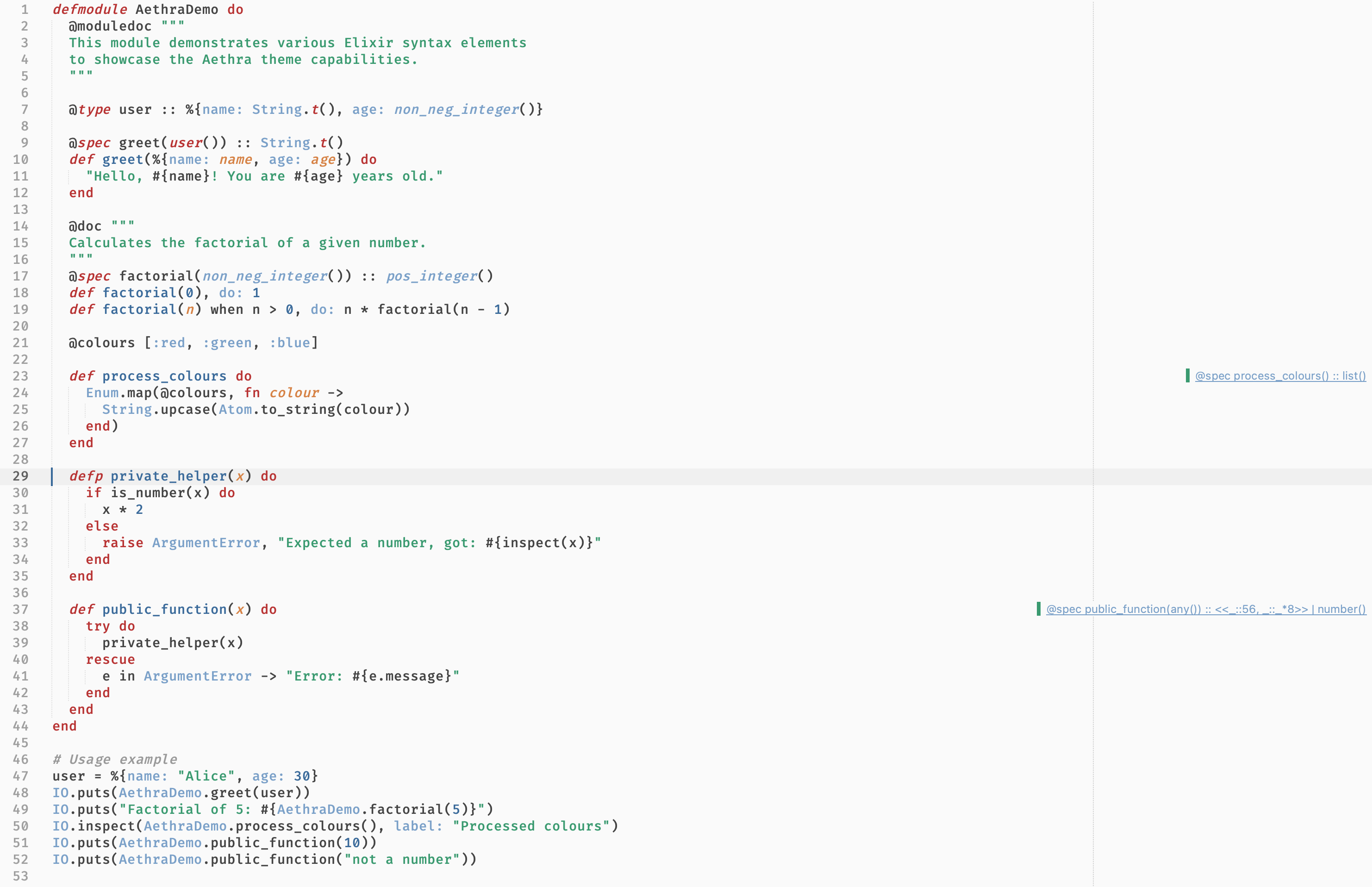
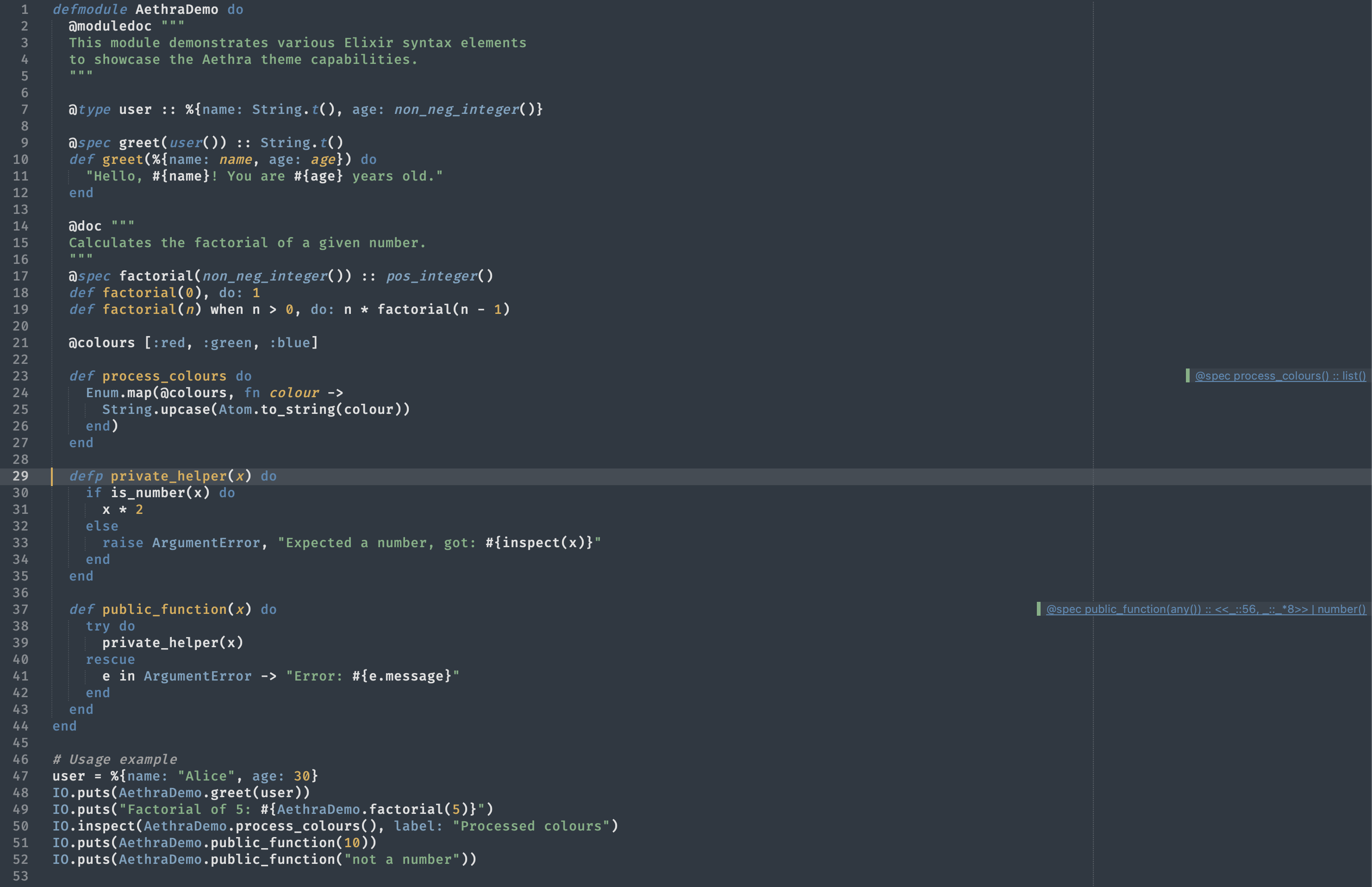
Here's a sample Elixir code to showcase the Aethra Color Scheme:
Light:
Dark:
Customization
Feel free to customize the color scheme to your liking. You can modify the .sublime-color-scheme files using Sublime Text's color scheme editor.
Contributing
Contributions are welcome! If you have any suggestions or improvements, please open an issue or submit a pull request.
License
This color scheme is released under the MIT License. See the LICENSE file for details.
Acknowledgements
Aethra Color Scheme was created by Pavel Vlasikhin. Special thanks to the Sublime Text community for inspiration and support.
Enjoy coding with Aethra!